

AV project mistakes are best prevented during planning, not simply corrected during installation. Avoiding common AV project mistakes starts with clear communication, defined requirements, controlled scope, and agreed responsibilities. Project closure matters too: a structured handover and review help ensure the system is understood and lessons are carried forward.
It is reasonable to focus on equipment and technical performance, but even a well-designed system can fall short when stakeholders have different expectations or key requirements emerge too late. A shared plan helps avoid common AV project mistakes by giving the team a basis for coordinating design decisions, schedules, responsibilities, and changes.
This article explains practical ways to strengthen communication, establish project scope and milestones, manage change, assign responsibilities, and close out the work. These disciplines show how avoiding common AV project mistakes supports a more coordinated project, from early design through final handover.
Key Takeaways
- Set clear communication routines so stakeholders can share feedback, track decisions, and address emerging issues promptly.
- Define project objectives, deliverables, constraints, resources, and milestones before work proceeds.
- Use a documented change-control process to assess how new requests affect scope, schedule, and workload.
- Assign responsibilities according to team members’ skills, and make ownership clear across project phases.
- Close with a structured handover and review to capture lessons learned and reduce the chance of recurring problems.
1. Setting team communication channels and routines
Establish a communication plan before design decisions begin. Identify stakeholders, team members, decision-makers, and channels for routine updates, technical questions, and urgent issues. For example, use a shared project log to record decisions and schedule a designated meeting for cross-disciplinary coordination. Keep the process consistent: document each decision, assign an owner, and communicate its effect on requirements or schedule. This gives everyone a reliable reference instead of leaving information scattered across email threads.
A communication plan should define when updates happen, who receives them, and what each update covers. A weekly project team check-in can take 15 minutes and focus on completed work, upcoming milestones, open decisions, and emerging risks. The project manager should also communicate scheduled deadlines and potential delays promptly. Clear status reporting supports stakeholder engagement, while early feedback can reveal conflicting expectations before they become design changes.
Choose collaborative tools that team members can use effectively. A shared task board can track owners and due dates, a decision log can capture approvals, and a controlled document workspace can store current drawings and requirements. The tools matter less than consistent use. Set out where the authoritative version of each document lives, how revisions are identified, and how team members flag unresolved issues. This reduces ambiguity when architects, MEP consultants, and IT teams coordinate.
An AV site survey and room assessment should document dimensions, seating layout, intended use, acoustic conditions, sightlines, and relevant infrastructure. It should also identify network coordination needs and locations that affect system placement, cabling, and user access. Recording these constraints early helps the team address them before they affect system design or construction coordination.
Select AV equipment by matching its capabilities to documented use cases, room conditions, and the wider system architecture. Confirm compatibility across required protocols, network bandwidth, VLANs, and quality-of-service requirements with the IT team. For scalability, consider planned system growth and whether the design can accommodate additional capacity without disrupting current functions. Record decisions and assumptions so stakeholders can see how each selection supports project requirements.
Communication should make room for disagreement and correction. Project managers should invite input from team members and stakeholders, then respond to concerns with a clear decision or next step. If people hesitate to share ideas or leave the project manager out of conversations, review the communication approach. A structured feedback route, honest status updates, and timely issue resolution help keep the team aligned.
2. Project planning, scope, resources, and milestones
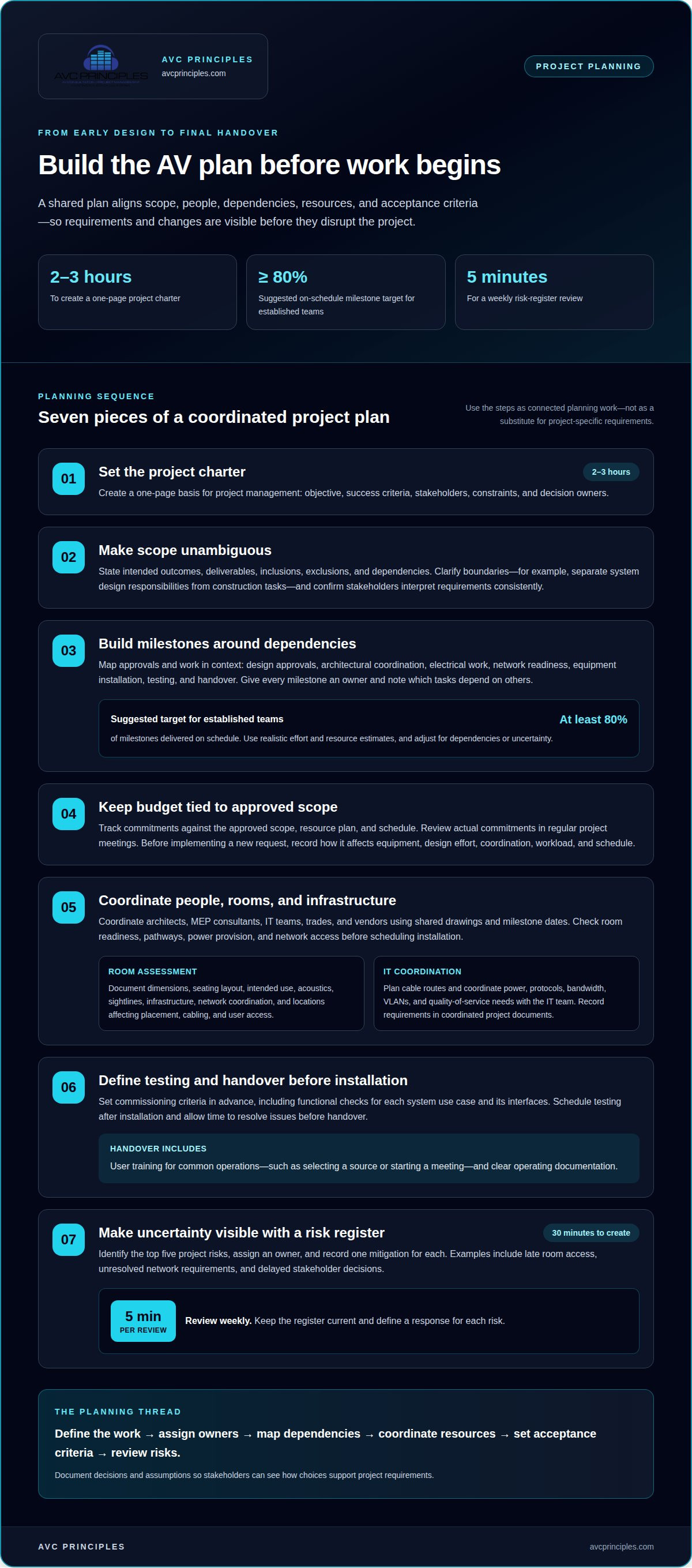
Start with a project charter that states the objective, success criteria, stakeholders, constraints, and decision owners. A one-page charter takes 2 to 3 hours to create and gives project management a basis for planning. Define the scope in practical terms: the intended outcomes, deliverables, inclusions, exclusions, and dependencies. For example, distinguish system design responsibilities from construction tasks. Confirm that stakeholders interpret each requirement consistently before estimating resources or setting milestones.
Build the schedule around dependencies, not just desired completion dates. Map design approvals, architectural coordination, electrical work, network readiness, equipment installation, testing, and handover. Assign an owner to each milestone and identify which tasks cannot begin until another is complete. For established teams, the suggested planning accuracy target is at least 80 percent of milestones delivered on schedule. Use realistic estimates for effort and resources, then adjust the schedule when dependencies or project familiarity create uncertainty.
Track the budget against the approved scope, resource plan, and schedule. Show planned allocations and record the effect of approved changes, rather than treating each new request as an isolated task. Review actual commitments against the plan at regular project meetings. If a requirement adds equipment, design work, or coordination, document the effect before implementation. Leadership can then make informed decisions about priorities, resources, and schedule trade-offs.
To avoid AV installation delays, coordinate architects, MEP consultants, IT teams, trades, and vendors using shared drawings and milestone dates. Identify dependencies such as room readiness, pathway completion, power provision, and network access before scheduling installation. Plan cable routes, power, network protocols, bandwidth, VLANs, and quality-of-service needs with the IT team. Requirements depend on the system design and intended use, so record them in coordinated project documents.
Define testing and commissioning criteria before installation, including functional checks for each system use case and its interfaces. Schedule testing after installation and allow time to resolve issues before handover. Include user training for common operations, such as selecting a source or starting a meeting, and provide clear operating documentation. Setting acceptance criteria early gives the team a shared basis for assessing readiness.
Plan for uncertainty with a simple risk register. Identify the top five project risks, record one mitigation for each, and review the register weekly; a review takes 5 minutes. Creating the register takes 30 minutes. Consider risks such as late room access, unresolved network requirements, or delayed stakeholder decisions. Assign an owner and define a response for each risk. This makes contingencies actionable and helps project leadership respond before a risk disrupts a milestone.
3. Scope creep and formal change control
Define AV project requirements before planning by translating organizational goals into measurable outcomes, deliverables, inclusions, exclusions, and constraints. For example, a control-room scope might specify which spaces require monitoring, which systems must integrate, and what functions operators need. Document expectations with stakeholders and resolve conflicts before approving the baseline. This gives the team a clear reference for assessing later requests, rather than treating every new idea as automatically included.
Scope creep often begins with a small request that seems harmless: adding a display, changing a room function, or expanding an integration. Each change can affect design effort, equipment coordination, schedule, and budget. Formal project management practices are associated with projects being up to 2.5 times more likely to succeed, measured by on-time delivery, staying within scope, and meeting business objectives. The practical lesson is to evaluate change deliberately, not to reject every request.
Establish a change-control process before work begins. Record each request, its reason, the requester, affected deliverables, and the decision owner. Then assess its impact on timeline, workload, budget, technical dependencies, and project priorities. For example, adding a video source may require revised signal routing, control programming, and user-interface updates. Document those consequences before approval so stakeholders understand the trade-offs.
Approval must be explicit. A project manager can assess and recommend a change, while the designated sponsor or decision owner accepts or declines it. Record the decision in the change log and update the scope baseline, schedule, and budget only after approval. This prevents informal instructions in meetings or email from becoming untracked commitments. Communicate approved changes to team members whose work or dependencies will shift.
Use the original scope to distinguish a clarification from an addition. Clarifying an existing requirement may explain how an agreed deliverable should function; adding a room or capability changes the agreed work. Evaluate both against organizational priorities and stakeholder expectations. A suggested control target is fewer than one significant approved scope change per month. Treat this as a prompt to examine repeated changes, not as a reason to bypass necessary approvals.
Review the change log at each project meeting. Look for repeated requests, unresolved decisions, and cumulative effects that may not be visible in individual records. If several requests modify the same control-room workflow, reassess whether the initial requirements captured operator needs. Consistent change control keeps scope decisions traceable, makes trade-offs visible, and helps the team deliver against an agreed baseline.
4. Project closure and lessons learned
Close the project with a review meeting focused on delivery, acceptance, and unresolved work. Compare the completed system with the approved requirements and record each outstanding item, its owner, and its next action. For example, if a control interface behaves differently from its agreed use case, document the gap and its resolution. A clear closeout record helps stakeholders understand what was delivered and what remains open.
Use the review to examine what worked and where the project faced challenges. Ask where coordination was effective, which decisions took too long, and what information arrived late. For example, a room layout change may have affected sightlines or speaker placement. Trace the sequence from the initial request through design coordination and implementation. This keeps the discussion grounded in project experience rather than general impressions.
When a mistake affects a client, the project manager should explain the corrective action and how similar problems will be prevented. Describe the issue plainly, state what changed, and identify the process improvement. For example, if an installation conflict resulted from outdated drawings, establish a controlled drawing register and confirm revision status at coordination reviews. A credible explanation connects the fix to a practical prevention measure.
Look for root causes instead of assigning blame. A missed requirement may stem from unclear ownership, incomplete stakeholder input, or a decision recorded in the wrong place. Ask what allowed the error, then identify a change the team can implement. If an AV network dependency was missed, one lesson might be to include IT review in the design approval workflow. The corrective action should address the cause, not just its visible effect.
Capture lessons in a format that can inform future projects. Record the issue, its effect, the root cause, the corrective action, and the person responsible for carrying it forward. Separate one-time events from recurring patterns. For instance, repeated late decisions may indicate that approval responsibilities need clarification during project setup. Assigning an owner makes the lesson actionable instead of leaving it as an observation in meeting notes.
Confirm that closure records are complete and accessible to the appropriate stakeholders. Include final system documentation, labeled connections, and any accepted outstanding actions. Then review lessons learned with the team and decide which practices should change on the next project. A thoughtful retrospective turns problems into evidence for improvement while recognizing the decisions and coordination methods that supported successful delivery.
Decide which practices and changes should carry into future work. Project closure should include a review meeting to discuss what worked and what did not during execution. Tie follow-up actions to the causes identified, then revisit them when planning similar work so useful improvements are not lost after the team disbands.
A concise record of these decisions gives the team a practical reference for future coordination and connects improvements to the experience that prompted them.
5. Clarifying project roles and competencies
Assign each project task to someone with the relevant skills and authority. A responsibility matrix can identify who leads design coordination, approves decisions, manages documentation, and handles technical reviews. For example, the network lead should own IT coordination, while the project manager tracks dependencies and deadlines. Make transfers of responsibility explicit. When two team members assume the other owns an approval, work can stall even when both have the right expertise.
Match the project manager’s experience to the project’s complexity and visibility. An experienced project manager is advised for highly visible or complex projects and projects with more than 10 team members. The role requires more than tracking tasks: the manager coordinates disciplines, escalates decisions, and connects technical work to organizational objectives. A project team benefits when leadership responsibilities are clear and team members know where to raise a dependency or unresolved issue.
Define decision rights alongside task ownership. Identify who recommends a technical approach, who reviews it, and who gives final approval. For instance, an AV design decision affecting network capacity needs input from AV and IT specialists, while the designated decision-maker resolves competing priorities. Project managers should delegate work and distribute workloads rather than trying to handle every task themselves. This reduces bottlenecks and lets specialists focus on decisions that require their knowledge.
Check whether the assigned workload uses each person’s capabilities effectively. A specialist assigned routine coordination may be underused, while a team member without relevant experience may struggle with a critical integration task. Project managers should ask for technical or subject matter expertise when needed. Strategic vision and leadership also matter: project professionals with those skills achieve 63% fewer failures than professionals focused only on technical processes.
Make role clarity visible during delivery. At a project meeting, review owners for upcoming milestones, unresolved decisions, and cross-team dependencies. A weekly team survey rated on a 1-5 scale can track clarity; the suggested target is an average score above 4.0. Low scores can prompt a focused discussion about unclear ownership, conflicting instructions, or workload imbalances before they affect deadlines.
Clear responsibilities reduce avoidable project management mistakes by connecting each task to an accountable owner and a defined decision path. To apply this structure to a complex AV initiative, discuss your AV project design needs.
Match each task to someone whose skills fit its demands. Project managers should assess whether assignments draw on team members’ capabilities and meet the expertise the work requires. If the match is poor, adjust responsibilities or bring in the relevant expertise. Revisit assignments as project needs change, keeping the connection between skills and tasks clear when work is delegated or reassigned. This can reveal both underused capabilities and tasks assigned to someone without relevant experience. Use those observations to refine task ownership and workload distribution, so every task has an appropriate owner and team members’ skills are put to effective use.
AVC Principles
AVC Principles helps organizations bring AV requirements, project scope, and technical coordination into a coherent design process. Its AV Systems Design and ICT Infrastructure Design address the relationship between system requirements and the infrastructure that supports them. For performance and presentation spaces, Staged Environment Engineering can align technical design with the intended environment.
Engage AVC Principles when a project involves multiple disciplines, complex integrations, or decisions that need coordination before implementation. Early design coordination can clarify responsibilities, dependencies, and requirements before they lead to avoidable changes during delivery.
Contact AVC Principles to discuss your AV project’s design needs and coordination challenges.
Put a disciplined plan into motion
The next step is to turn project intent into decisions that guide design and delivery. Before work advances, align the technical approach with the venue’s purpose, operating needs, and future direction. This gives stakeholders a clear basis for resolving trade-offs as the project develops. Avoiding common AV project mistakes means treating planning as part of the engineering work, not as a preliminary formality.
AVC Principles supports this work through AV Systems Design, ICT Infrastructure Design, and Staged Environment Engineering. These disciplines connect system requirements with the spaces and infrastructure they depend on. Early design involvement is especially useful when AV decisions intersect with architecture, IT, or a staged environment.
Bring your project objectives and coordination priorities into the next conversation. Contact AVC Principles to discuss your project and determine a clear path forward. A deliberate start gives your team a stronger foundation for the work ahead.
Frequently Asked Questions
What are the most common audiovisual (AV) project mistakes?
Common AV project mistakes include treating technology as a late-stage addition, overlooking room acoustics, and designing controls around technical functions instead of user tasks. For example, a meeting room may have capable equipment but still perform poorly if speech is unclear or users cannot start a call easily. Incomplete documentation can also complicate troubleshooting. These issues are often connected: an early design decision can affect room construction, system usability, and future support.
How do you budget for an AV project, including installation and ongoing costs?
Build the budget from defined project requirements and account for design, equipment, installation, integration, testing, training, and ongoing operations as separate categories. The balance depends on system complexity, room conditions, construction readiness, and required integrations. Include an allowance for identified project risks, and track approved changes against the budget baseline. For ongoing planning, consider staff training, documentation updates, and any maintenance or support arrangements under consideration.
What are common AV system design mistakes involving acoustics, lighting, and displays?
Common design problems include overlooking reverberation, placing microphones or speakers without considering coverage, and positioning displays where sightlines are obstructed. Hard surfaces and untreated ceilings can affect speech clarity, so room use, seating, and dimensions should inform acoustic analysis and treatment. Lighting also matters: assess whether the intended presentation or performance environment creates glare or reduces screen visibility. Evaluate display locations from actual viewing positions, not only architectural drawings.
What AV project risks, warranties, maintenance, and support plans should be considered?
Assess risks that could affect system performance or operational continuity, including room changes, network dependencies, delayed decisions, and integration issues. Before procurement, document warranty terms, coverage limits, claim procedures, and the party responsible for support. Define how faults will be reported, who maintains system documentation, and what internal staff can handle. A support plan should reflect the system’s operational importance and the organization’s capacity to manage routine troubleshooting.


