

A scoreboard can be technically advanced and still fail if spectators can’t read it quickly. Effective stadium scoreboard system design coordinates power, data, sound, and displays around clear priorities: make the score and game clock prominent, keep supporting information legible, and account for the venue’s viewing conditions.
That coordination matters because a scoreboard is part of a larger venue system, not an isolated screen. Its layout, connections, and audio integration all shape how information reaches spectators and players during an event.
This article covers practical design decisions for outdoor sunlight, weather, distant and angled views, changing sports, and future requirements. It explains how spacing, digit size, contrast, and separation of game data from sponsor content support readability, while integrated sound helps maintain a consistent game pace. Together, these considerations help define the display, infrastructure, and coordination needs of a stadium project.
Key Takeaways
- Plan power, data, display, and sound as coordinated systems so the scoreboard supports the full event workflow.
- Assess sunlight, weather exposure, viewing distance, and extreme angles when determining display placement and visibility needs.
- Structure layouts to accommodate different sports and changing requirements without creating clutter or inconsistent information.
- Integrate scoreboard content with venue audio to reduce confusion and help maintain game flow.
- Prioritize score and time, then use clear spacing, readable digits, and contrast to make supporting details easy to scan.
Coordination of power, data, sound, and display systems
A stadium scoreboard depends on coordinated infrastructure, not just the LED screen. Begin with the display location, then map power distribution, data pathways, audio connections, and control positions. This sequence can expose conflicts early, such as a cable route crossing an access area or a control point lacking a clear view. The design team can then coordinate the system layout before installation details are fixed.
For each display, document its content sources and signal path. Score and game-clock data need a defined route to the screen; video and sponsor content need planned inputs. Coordinate audio with the venue’s sound system so announcements and event audio are part of the operating plan. A clear signal-flow drawing shows where sources enter, how signals are routed, and which control position manages each function.
LED screens support changing digital content, but their physical scale affects infrastructure planning. For large-scale installations, major video boards frequently measure over 100 feet wide and 60 feet tall. Situation: A display of that scale requires coordinated planning across its supporting structure, power, data, and control systems. Action: Use the display dimensions to establish equipment locations and cable routes. Result: The resulting design makes system dependencies visible before construction decisions are finalized.
Multi-display configurations offer another useful scale example, featuring a large main video screen paired with flanking auxiliary displays. Situation: A central video screen and side displays create several visual zones. Action: Assign each zone a defined purpose, such as game information, video, or supporting content. Result: Operators can plan content distribution across the structure rather than treating every screen as an unrelated endpoint.
Indoor display readability depends on the room as well as the screen. At an indoor arena, assess the screen’s position against seating sightlines, nearby lighting, and the visual background. Test score and clock placement with representative game content. Keep essential information prominent, and make sure supporting graphics do not compete with it. Digital displays can change content quickly, but a clear hierarchy still helps viewers find what matters.
Before finalizing a stadium scoreboard system design, coordinate these four checks:
- Map power and data routes to every display and control position.
- Assign a purpose to each LED screen or digital display zone.
- Coordinate audio sources and control with scoreboard operations.
- Review indoor sightlines and sample content for clear information hierarchy.
Outdoor sunlight, weather, and viewing angles
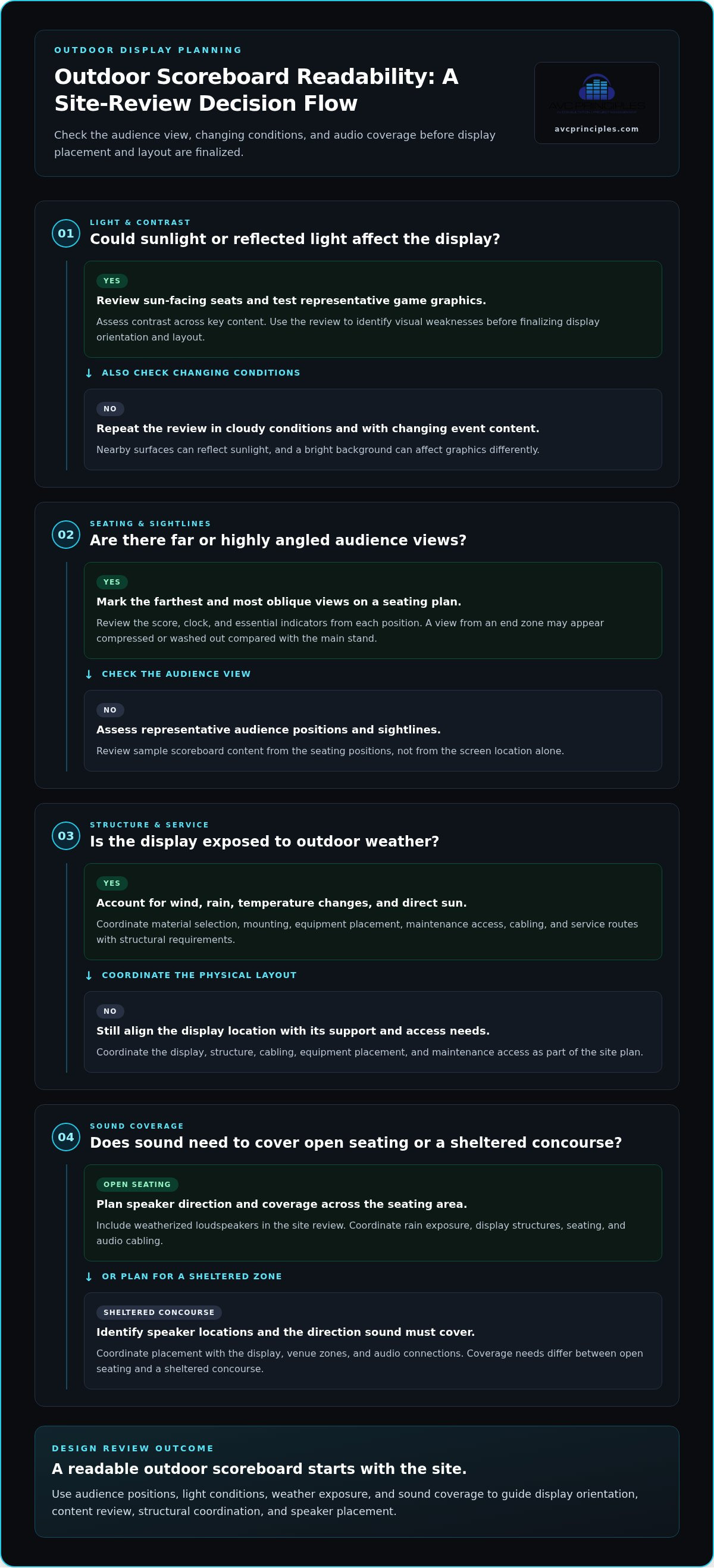
Outdoor displays face changing light, weather, and sightlines across the seating bowl. Begin with audience positions, not a screen specification in isolation. Map where spectators sit, then assess whether sunlight reaches the display directly or reflects from nearby surfaces. This review helps identify viewpoints where brightness, contrast, or screen orientation may limit legibility.
Viewing angles matter at the stadium edges as well as the center. A screen that reads clearly from the main stand may appear compressed or washed out from an end zone. Use a seating plan to mark the farthest and most oblique views. Review the score, clock, and essential indicators from each position. This practical check shows whether placement and content hierarchy serve the whole venue.
Weather exposure affects the display structure and supporting systems. Wind, rain, temperature changes, and direct sun influence material selection, mounting, access, and equipment placement. Coordinate the display location with structural requirements and maintenance access. For example, a position exposed to prevailing weather may need a different access strategy from a sheltered concourse location. Addressing these constraints early helps align the screen, support, cabling, and service routes.
Situation: An outdoor scoreboard must remain readable in bright afternoon sunlight. Action: Review the screen from sun-facing seats, test representative game graphics, and assess contrast across key content. Result: The design team can identify visual weaknesses before finalizing display orientation and layout. Repeat the review in cloudy conditions and with changing event content, since a bright background can affect graphics differently.
Include weatherized loudspeakers in the same site review. Identify speaker locations, rain exposure, and the direction sound must cover. Coordinate placement with display structures, seating, and audio cabling. A loudspeaker aimed across open seating has different coverage needs from one serving a sheltered concourse. Align the audio plan with the scoreboard’s operating zones so announcements and event sound support the venue rather than compete with screen content.
Use this sequence for a focused outdoor review:
- Map direct sunlight, seating views, and extreme viewing angles.
- Assess weather exposure at displays, supports, cabling, and loudspeakers.
- Review sample scoreboard content from representative audience positions.
- Coordinate display and audio placement with access and structural planning.
These checks connect visibility with the physical conditions around each display. For venues coordinating display and infrastructure decisions, integrated venue system planning can help frame the design requirements.
Flexible layouts for multiple sports and future needs
A stadium display may serve different sports, events, and operating teams. A fixed content arrangement can make those changes harder to manage. Start by separating essential game information from fields that vary by sport. For example, football needs different supporting indicators than baseball or softball. Keep the score and clock easy to locate, with sport-specific information in consistent secondary zones.
Build each configuration around a defined content hierarchy. Identify what stays constant, which fields change, and which display areas support video or sponsor content. Then create a layout profile for each sport and event type. Consistent placement helps operators switch profiles without rebuilding the visual structure. It also gives spectators a familiar reference point when the event changes.
Situation: Eagle Stadium at Trinity Christian Academy in Willow Park, Texas, has seating for 1,000 people. Action: The venue is the first part of a three-phase project adding baseball and softball fields and track facilities. Planning across those sports and facilities calls for layouts that can serve distinct event needs. Result: A flexible design approach supports a broader campus program, rather than treating each event display as an isolated use.
Future flexibility also depends on how the system handles revisions. Use editable templates for team names, score fields, periods, and event graphics. Keep these elements in defined zones so a content update does not disrupt the rest of the screen. A baseball profile, for example, can allocate space to innings and outs. A football profile can use corresponding zones for its game information.
Clutter remains a risk, even with digital displays. Adding every possible statistic, message, or sponsor element can weaken the hierarchy. Set priorities before laying out each profile, then review spacing and alignment across sports. Keep essential game data distinct from promotional content. A consistent grid makes differences between profiles deliberate rather than accidental.
Plan for future needs through a structured review. List current sports and event formats, then identify likely changes to the venue program. Map each requirement to a display zone and content source. Review the result with the people responsible for game operations and event presentation. Their feedback can reveal missing fields or competing priorities before the layout is finalized.
- Define a separate profile for each sport and event format.
- Keep essential information in consistent zones across profiles.
- Use editable templates for changing team, score, and event details.
- Review additions for clutter before assigning them screen space.
Integrated scoreboard and sound system design
In the United States, scoreboard requirements depend on the sport and competition. No single layout can be assumed to meet every league’s rules. Identify the events the venue will host, then align displayed game information with the applicable competition requirements.
Scoreboard audio and visual information should work as one event communication system. Game data communicates status; sound carries announcements, cues, and event audio. If these systems operate without coordination, overlapping messages can confuse spectators or interrupt the game’s pace. A shared operating plan clarifies what appears onscreen and which messages use the sound system.
Start by mapping event actions to audience information. For a scoring change, for example, the operator may update the score while an announcer provides context. Define who triggers each action, which system carries it, and how operators avoid competing messages. This sequence gives the control team a clear response during active play.
Situation: A venue uses its scoreboard for game updates and sponsor messages. Action: Separate game data from promotional content and coordinate announcements with the display schedule. Result: Spectators can find game information without unrelated content obscuring it. This separation also helps operators identify content that needs immediate updates.
Audio coverage should reflect the seating layout and operating zones. A field-level announcement and a concourse message may serve different listeners. Map loudspeaker locations alongside scoreboard positions, then identify where sound coverage overlaps. Coordinating these zones helps reduce competing announcements and supports consistent communication across the venue.
During planning, use event scenarios to test system behavior. For example, simulate a score update, a timeout announcement, and a scheduled sponsor message. Confirm the intended display and audio sequence for each event. This review can reveal unclear responsibilities, timing conflicts, or competing content before the system enters operation.
Make operator workflows explicit. Define how scoreboard data reaches the display, how the audio team receives event cues, and which control positions manage each task. A documented signal-flow plan makes these relationships easier to review and gives technical and event teams a shared reference for rehearsing game-day procedures.
Use this integration checklist during design:
- Identify hosted sports and the competition-specific information each requires.
- Assign owners for score updates, announcements, and scheduled content.
- Map audio zones against seating areas and display locations.
- Rehearse sample events to find timing or message conflicts.
Clear scoreboard information can reduce confusion and interruptions, helping maintain a consistent game pace. Coordinating sound and display operations around defined event scenarios turns that objective into a practical workflow.
Scoreboard requirements depend on the sport and competition, so no single layout meets every league’s rules. Venues should identify the events they host and align displayed game information with the applicable competition requirements.
Spacing and digit size for readability
Assess accessibility and visibility against the venue’s applicable accessibility criteria and each sport’s competition rules. Keep essential information legible from designated seating positions, including distant and angled views.
Start with the score and game clock. These elements carry the central information, so give them the strongest visual priority. Supporting details, such as period, fouls, and possession, should remain visible without competing with the score. Spectators should be able to distinguish the main figures from secondary indicators at a glance.
Spacing helps make that distinction. Separate information groups with clear gaps and align related fields consistently. For example, place a period indicator near the game clock, not between the teams’ scores. Grouping fields this way helps prevent digits and labels from blending together across a large venue.
Digit size should reflect viewing distance and position. Larger digits can improve readability, but size alone cannot solve every visibility problem. Consider the full layout, contrast between text and background, and whether nearby graphics distract from game information. Review the design from far seats and oblique angles, not only from the center of the stands.
Situation: A scoreboard shows the score, clock, period, fouls, and possession in one panel. Action: Give the score and clock the most prominent positions, then group supporting indicators with consistent spacing. Use high-contrast visuals to distinguish digits from the background. Result: Viewers can locate essential game information quickly, while secondary details remain accessible without dominating the display.
Check the layout with representative content before finalizing it. Review single- and double-digit scores, changing clock values, and labels used during play. Confirm that team names remain distinct from scores and that period or possession indicators do not appear attached to neighboring fields. These examples can reveal spacing problems an empty screen may conceal.
Use a practical review sequence:
- Identify the score and clock as primary information.
- Group period, fouls, and possession as supporting details.
- Check spacing between every label, value, and information group.
- Review digit size, contrast, and visibility from varied seating positions.
For a focused design review, assess scoreboard readability against real content, seating views, and the visual hierarchy required during play.
Treat spacing and digit scale as complementary choices, not separate finishing touches. Larger digits and high-contrast visuals improve scoreboard readability. Keep the score and clock prominent, with enough separation around team names and supporting indicators for each field to read as a distinct group. Proper spacing helps prevent information from blending together at a distance. Clear gaps should show relationships without disconnecting related items, and consistent alignment helps viewers locate each field.
During the final review, examine the display with changing scores, clock values, and labels used during play. Check that digits remain distinct from nearby labels and supporting information does not crowd the primary fields. Review the arrangement from distant and angled seating positions, paying particular attention to whether groups remain recognizable. If anything appears crowded or difficult to distinguish, adjust its spacing, size, or contrast, then review the layout again. The aim is a display where essential information stands out and supporting details remain easy to find.
AVC Principles: AV Systems Design
AVC Principles provides AV Systems Design for venues coordinating scoreboard displays, audio, and event operations. This service is suited to projects that need these elements planned as an integrated venue system rather than as separate technical decisions. ICT Infrastructure Design addresses supporting networks and data pathways, while Staged Environment Engineering and Command and Control Center Design can support related operational requirements.
The design process translates viewing, content, and operating needs into coordinated system plans. This is especially relevant for a new venue or a significant scoreboard upgrade, when infrastructure choices affect display performance and event workflows.
To discuss your venue’s design requirements, contact AVC Principles.
Set the Design Direction for Your Venue
The next step is to turn operational priorities into a clear design brief. Identify the events the venue must support, the audience experience it needs to deliver, and the system decisions requiring coordination. This gives project teams a shared basis for evaluating options and carrying requirements into detailed planning. A well-defined brief also keeps future changes connected to the venue’s core objectives.
For stadium scoreboard system design, AVC Principles can contribute through AV Systems Design, ICT Infrastructure Design, and Staged Environment Engineering. These disciplines address the display and audio environment, supporting infrastructure, and technical demands of staged events. Their relevance depends on the scope and needs of the venue project.
Bring your project priorities into the next planning conversation. Contact AVC Principles about your project to discuss a considered path forward. A clear brief is a strong starting point for the work ahead.
Frequently Asked Questions
How do stadium scoreboards connect to timing, scoring, and statistics systems?
Scoreboards receive game information from timing, scoring, and statistics sources through a planned signal path. System design identifies each source, the data it supplies, and the display fields that use it. For example, a clock value and score update may feed separate screen fields. Operators need a clear workflow for entering or receiving updates, reviewing them, and presenting the correct information during play.
What are typical stadium scoreboard display sizes, resolutions, and brightness levels?
There isn’t one typical size, resolution, or brightness level for every stadium. Display dimensions depend on viewing distance, screen placement, venue geometry, and the amount of content shown. Resolution should suit the display’s physical dimensions and intended content, while brightness must account for ambient light and viewing conditions. A design review should assess representative content from the audience’s actual sightlines, including distant and angled seats.
How do LED video boards compare with traditional scoreboards in cost and performance?
LED video boards support changing visual content, while traditional scoreboards generally focus on fixed game information. The right approach depends on the venue’s event program, content requirements, and operating priorities. Compare intended functions, visibility, content workflow, and infrastructure demands. Costs depend on project scope and design factors, so a meaningful comparison considers the full system, not screen type alone.
What power, network, and control-room infrastructure does a stadium scoreboard require?
A stadium scoreboard requires coordinated power distribution, data pathways, display connections, and operator controls. The design maps each display to its power and data routes, then identifies where operators manage content and game information. For example, a control position needs access to relevant sources and a clear operating workflow. Network planning should account for the scoreboard’s data requirements and coordination with other venue systems.


