
The strongest conferencing design decisions are made before system requirements are finalized. Collaborative conferencing system engineering starts with input from the people who will use, support, and integrate the system. Shared objectives and clearly documented needs help align room technology with meeting workflows and technical constraints.
It is easy to focus first on displays, cameras, microphones, and platforms. But the system must also connect with existing tools, work across disciplines, and support how teams make decisions. Bringing stakeholders together early surfaces those needs while the design can still address them.
This article explains how early involvement shapes requirements, supports adoption, and coordinates engineering disciplines. It outlines the system capabilities to consider and how integration with engineering tools and workflows can support collaboration. Together, these points give teams a clearer basis for planning, evaluating design choices, and defining effective system engineering.
Key Takeaways
- Bring decision-makers and end users into planning early to align objectives, terminology, and expectations before design decisions take hold.
- Agree on ownership, usage rights, and commercialization arrangements in advance when engineering collaboration involves shared intellectual property.
- Coordinate technical disciplines through structured communication and shared collaboration methods to reduce misunderstandings and keep work aligned.
- Assess conferencing capabilities against engineering tasks, including detailed screen sharing, annotation, and appropriate access controls.
- Connect collaboration tools with calendars, task lists, and searchable document repositories so information supports established engineering workflows.
Early stakeholder involvement
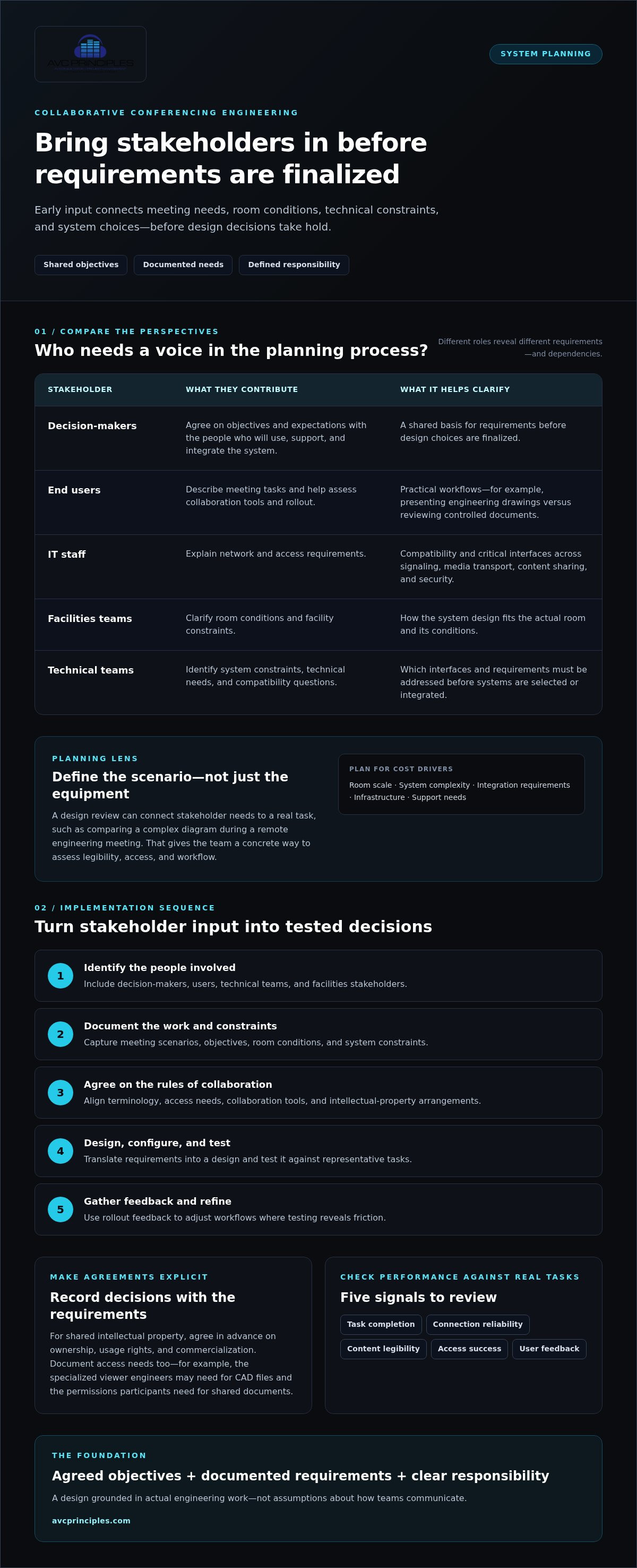
Early involvement brings decision-makers, end users, facilities staff, and technical teams into the same planning process. They agree on objectives and terminology before requirements are finalized. For example, “content sharing” might mean presenting engineering drawings to one group and reviewing controlled documents with another. Defining that difference gives designers a practical basis for decisions.
Stakeholders can also identify constraints that a single discipline might miss. End users describe meeting tasks, IT staff explain network and access requirements, and facilities teams clarify room conditions. A design review can connect those needs to real scenarios, such as comparing a complex diagram during a remote engineering meeting. Involving users in tool selection and rollout also helps keep the workflow practical.
Protocols and standards help conferencing platforms, room systems, networks, and engineering tools work together. Design teams should assess compatibility for signaling, media transport, content sharing, and security within the project’s existing environment. Stakeholders can identify critical interfaces and technical requirements before systems are selected or integrated.
Deployment and maintenance costs vary with room scale, system complexity, integration requirements, infrastructure, and support needs. Planning should account for equipment, configuration, testing, software or platform requirements, and future maintenance. Early input helps identify these cost drivers before they lead to late design changes.
A practical implementation sequence turns stakeholder input into engineering decisions:
- Identify decision-makers, users, technical teams, and facilities stakeholders.
- Document meeting scenarios, objectives, room conditions, and system constraints.
- Agree on terminology, access needs, collaboration tools, and intellectual-property arrangements.
- Translate requirements into a design, then configure and test it against representative tasks.
- Collect user feedback during rollout and refine workflows where the testing reveals friction.
For example, engineers reviewing CAD files may need a specialized viewer, while meeting participants need clear permissions for shared documents. Agreeing in advance on ownership, usage rights, and commercialization can also address intellectual-property concerns. Record these decisions with the requirements rather than leaving them to informal assumptions.
Measure performance through task completion, connection reliability, content legibility, access success, and user feedback. Compare results with the original scenarios, such as whether remote participants can interpret a shared engineering diagram. Review recurring support issues and meeting outcomes to see where configuration or workflow changes are needed.
Early stakeholder involvement gives collaborative conferencing system engineering a clear foundation: agreed objectives, documented requirements, and defined responsibility for decisions. The resulting design reflects actual engineering work, not assumptions about how teams communicate.
A shared vocabulary and agreed objectives give participants a consistent frame for discussing the project from its outset. They can refer to those foundations when considering how collaboration tools fit the work, helping keep expectations connected to the goals established at the start rather than allowing different interpretations to develop.
Team members should help choose collaboration tools and plan their rollout. Including the people expected to use the tools can support adoption. Keeping their involvement tied to shared language and objectives helps ensure tool choices contribute to the same collaborative effort.
Interdisciplinary engineering teamwork
Engineering collaboration connects disciplines that use different methods and technical language. A conferencing project may involve electrical engineers, software developers, network specialists, acousticians, and facilities teams, each with distinct constraints. A network specialist may focus on bandwidth, while an acoustician considers microphone placement and room reflections. Shared working sessions help expose these dependencies before one discipline’s decisions limit another’s options.
Tools should support the work, not just provide a meeting space. Virtual whiteboards let teams diagram signal paths and resolve interface questions together. CAD and MATLAB tools support concurrent design and simulation, while Git helps coordinate code development. Jupyter Notebooks can support joint data analysis. A central collaboration hub with wiki functions can preserve calculations, reference notes, and agreed practices.
Structured communication matters just as much. Regular design reviews can bring disciplines together around a drawing, simulation, or open issue. Participants should identify the decision required, the technical evidence, and the owner of the next action. A proposed display change, for example, can affect structural support, cable routes, control programming, and sightlines. Recording these dependencies makes follow-up more precise.
Leading conferencing platforms differ in the capabilities they emphasize, such as technical screen sharing, annotation, breakout discussions, recording, and integration with engineering tools. Engineering teams can compare platforms against actual tasks, such as jointly reviewing a detailed diagram or discussing a simulation result.
Security, privacy, and compliance risks include unauthorized access to intellectual property, exposure of sensitive project information, and unintended distribution of meeting recordings. Encryption and access controls help protect collaboration sessions. Teams should define who can join, view shared files, record sessions, and retain meeting content.
Interdisciplinary teams can improve collaboration through practical working agreements:
- Use a shared workspace for current drawings, calculations, decisions, and meeting records.
- Apply version control so concurrent edits do not obscure the approved design state.
- Set meeting agendas around defined technical questions, such as interface ownership or simulation assumptions.
- Record decisions with an accountable owner and a clear next action.
- Align project outcomes, milestones, and success measures across participating teams.
These practices combine resources, knowledge, and facilities across disciplines. They also make disagreements visible while the team can still examine the underlying assumptions. For projects where room technology and technical infrastructure must work as one, integrated system design can connect the engineering disciplines involved. Interdisciplinary research teams can combine resources, knowledge, and facilities to work more effectively. Academic and industry partners can align their interests by defining project outcomes, milestones, and success metrics together. Shared outcomes provide a common basis for assessing progress and addressing differences in priorities.
Engineering teams can use virtual whiteboards for diagramming, brainstorming, and collaborative problem-solving. Collaborative design and simulation tools, including MATLAB and CAD software, allow engineers to work simultaneously on complex projects. Version control systems such as Git facilitate concurrent code development, and Jupyter Notebooks support joint data analysis. Universal collaboration platforms and regular, structured meetings can help reduce communication misunderstandings.
What are the core components of a collaborative conferencing system?
A collaborative conferencing system combines room technology, network services, conferencing software, and shared content workflows. Each component should support a defined engineering task. Reviewing a complex diagram, for example, requires usable screen sharing, clear audio, and access to the correct file. A weakness in one layer can disrupt the meeting even when the others work correctly.
Capture and playback. Cameras and microphones capture participants, while displays and loudspeakers bring remote contributions into the room. Their configuration depends on the room layout and meeting format. A small team reviewing a CAD drawing has different framing and audio needs from a control room coordinating several participants.
Content presentation. Screen sharing brings technical visuals into the discussion. High-resolution sharing helps engineers inspect detailed diagrams, while annotation tools let participants mark areas for review. A meeting about a design change may also require recording so absent team members can revisit the discussion and its decisions.
Conferencing and control. The conferencing platform manages sessions and connects remote participants. Room controls provide a consistent way to start a meeting, select sources, and adjust the room system. Clear control logic matters: someone presenting a simulation should be able to share it without losing meeting audio or switching to the wrong source.
Network and security. Network services carry audio, video, and shared content between room devices and remote users. Encryption and access controls help protect engineering discussions and intellectual property. Permissions should reflect who needs to join a session, view documents, or access shared content.
Collaboration workspace. The meeting platform is only one part of the workflow. A collaboration hub can connect calendars, task lists, and document repositories, then make stored content searchable. Teams can link a design review to its reference files and follow-up tasks. Version control and change tracking help distinguish current engineering documents from earlier revisions.
These components function as a connected system, not a collection of isolated devices. A team reviewing a complex diagram needs a suitable viewer, legible screen sharing, permission to access the document, and a reliable way to discuss changes. Collaborative conferencing system engineering brings these dependencies into one design, aligning room functions with digital workflows.
System requirements should reflect the meeting use case. A design review prioritizes visual detail and annotation; a distributed project meeting may rely more on searchable records and shared task lists. Mapping each scenario to capture, presentation, control, network, and workspace functions gives engineers a practical way to assess the complete system.
What are the requirements for designing a collaborative conferencing system?
Start with the engineering tasks the system must support. A design review, remote troubleshooting session, and project coordination meeting each place different demands on conferencing. Teams examining detailed drawings need clear visual sharing, while troubleshooting may depend more on discussion and annotation. Before selecting capabilities, map each task to its participants, content, room conditions, and intended outcomes.
Visual performance is a core requirement. Conferencing tools for engineering should support high-resolution screen sharing so participants can inspect detailed technical visuals. A remote reviewer, for instance, should be able to distinguish relevant lines and labels on a complex diagram. Annotation tools let participants identify a specific area and discuss a proposed change without relying on verbal descriptions alone.
Plan meeting functions around the work. Recording can support review of technical discussions, while breakout rooms can separate working groups during a larger session. Annotation lets participants mark up shared content. Each function should serve a defined scenario: a design group might review a drawing together, then split into smaller discussions before returning to the main meeting.
- Visual clarity: Match screen-sharing quality to the detail in engineering diagrams and other technical content.
- Discussion tools: Use annotation and breakout rooms where they support review and focused collaboration.
- Session records: Consider recording for workflows that need a reference to meeting discussions.
- Security controls: Include encryption and access control in tool selection to protect intellectual property.
- Room fit: Align system layout and control with how participants use the space and share content.
Set security requirements according to the information being discussed. Engineering sessions may expose intellectual property through shared files, screen content, or recordings. Encryption and access control are important considerations when choosing collaboration tools. Define access by project role, including who can join a session and view shared materials. Recording settings should also reflect how meeting content will be used.
Room and infrastructure requirements should reflect actual meeting conditions. Teams presenting complex diagrams need displays positioned for clear viewing, and microphones must capture participants without obstructing discussion. Network planning must account for audio, video, and content-sharing demands. Aligning room design, conferencing functions, and ICT infrastructure helps prevent conflicts between the physical environment and digital workflow.
Define how the system will be evaluated before deployment. Test representative tasks, such as sharing and annotating a technical visual with remote participants. Check whether users can access the intended content and complete the meeting workflow. These task-based acceptance criteria give the design team a clear basis for commissioning and future refinement.
How do collaborative conferencing systems integrate with engineering tools and workflows?
Integration connects meetings to the surrounding work. An engineering collaboration hub can bring calendars, task lists, and document repositories into one searchable environment. A calendar entry can anchor a design review, while its repository holds the relevant drawings. After the discussion, a task list can capture follow-up work and its assigned owner.
Cloud-based platforms support data sharing and collaborative analysis by providing access to large datasets. Geographically distributed engineers, for example, can examine the same dataset during a review and discuss its implications together. The platform makes relevant information accessible within the collaborative process, while teams maintain clear document organization, permissions, and working practices.
Product lifecycle management applications can extend the review cycle beyond the meeting. Modern PLM apps let users review, approve, comment on, and provide feedback about product and enterprise application data. A conferencing discussion can inform a formal review or approval workflow. Connect decisions to the relevant record so comments and outcomes remain associated with the correct item.
Engineering files need appropriate viewing capabilities. Teams sharing CAD files or complex diagrams should prioritize specialized viewers. Engineering document-sharing platforms can include viewers for formats such as .dwg, .def., and Revit. A reviewer may need to inspect a drawing during a discussion without converting it into a less useful format. Ensure the viewer and meeting workflow support the file types engineers exchange.
Project-management tools also connect collaboration to execution. Gantt charts can show sequenced work, while Kanban boards make task status visible. After a design review, teams can move agreed actions into these planning tools, linking technical discussion to ownership and project progress rather than leaving decisions isolated in meeting notes.
Collaborative engineering software can support standardized, modular production planning and manufacturing across locations. Shared processes help teams apply consistent planning methods and coordinate work between sites. Conferencing can support discussions about those processes, while relevant project records and tasks remain accessible through connected tools.
A useful integration model follows information through its lifecycle:
- Use a calendar entry to connect participants with the meeting and its purpose.
- Make the source documents or datasets accessible through the collaboration workspace.
- Discuss findings using the relevant viewer or analysis environment.
- Record comments, approvals, or feedback in the appropriate project record.
- Transfer agreed actions into the team’s task or project-planning system.
This workflow reduces unnecessary handoffs between conferencing and engineering systems. To align meeting technology with project workflows, plan integrated conferencing system design around the tools, files, and collaboration patterns engineers use.
AVC Principles: AV Systems Design
AVC Principles can translate conferencing requirements into an engineered AV system for your venue. Its AV Systems Design connects room technology, user workflows, and project requirements from concept development through commissioning. This is a practical next step when your team needs to coordinate displays, audio, conferencing functions, and integration with the wider technical environment.
For projects where connectivity and system interfaces are central, ICT Infrastructure Design can align supporting infrastructure with the AV design. The work can also address specialized environments, including command and control centers and staged settings, where operational needs shape system decisions.
If your project is moving from requirements into design, contact AVC Principles to discuss the engineering scope.
Set the next project phase in motion
A conferencing project moves forward when its technical direction reflects the work people need to perform. In your next planning discussion, identify decisions that need an owner, interfaces that require coordination, and outcomes that should guide the design. This gives stakeholders a practical basis for moving from requirements to an engineered solution.
That is where collaborative conferencing system engineering becomes project-specific. AVC Principles supports this work through AV Systems Design and ICT Infrastructure Design. For venues with performance or event requirements, Staged Environment Engineering can also inform technical planning. The appropriate scope depends on the environment and the system’s role within it.
Bring your project objectives and technical priorities into the next conversation. Contact AVC Principles to discuss your project and consider the design work needed to carry it forward. A clear starting point helps your team shape the next phase with purpose.
Frequently Asked Questions
What is a collaborative conferencing system in systems engineering?
A collaborative conferencing system is an integrated environment that enables systems engineers to communicate, review technical information, and coordinate decisions across disciplines. Collaborative conferencing system engineering connects meeting technology with engineering workflows, such as reviewing a system diagram while discussing interface requirements. It supports shared analysis and coordinated work, but does not replace engineering judgment or formal project records. Design the system around the team’s technical tasks and information needs.
Which protocols and standards support collaborative conferencing systems?
Protocols and standards for signaling, media transport, content sharing, and security support interoperability across conferencing platforms, room systems, networks, and connected engineering tools.


